

Salesforce Access Risk: How Hidden Permissions Create Security Blind Spots



Salesforce Access Risk: How Hidden Permissions Create Security Blind Spots
Uncover hidden power and privilege in your organization. Learn how scattered permissions, connected apps, and APIs create Salesforce access risk.
The Illusion of Admin: Who Really Has Privilege in Salesforce?
Ask a Salesforce Admin who has the most privilege in their Salesforce organization, and they will likely point to users with the System Administrator profile. That’s a reasonable answer, but it’s incomplete. Privilege is distributed across hundreds of individual settings: profiles, permission sets, API tokens, connected apps, and automation configurations. The result is a group of security principals with unknown capabilities: users, integrations, and automations that have accumulated enough privileges to be potentially dangerous. But, no one is looking for them.
Before we can uncover these unknown capabilities, we need to answer a more fundamental question: What does privilege actually mean in Salesforce?
What Makes Something “Privileged”?
In most security contexts, “privileged” usually means administrative access, the ability to make organizational changes, or access to sensitive data that most users cannot reach. In many systems, the platform itself defines what counts as privileged. Salesforce, however, does not. That ambiguity is part of the problem. If we really want to understand who has privilege in a Salesforce organization, we first need a clear, shared definition of what “privilege” actually means.
For our purposes, a privilege stems from any Salesforce setting, permission, or capability that grants a security principal the ability to:
Access, modify, or export data at scale
Modify or override security controls, access policies, or audit configurations
Grant, escalate, or modify privileges and permissions for themselves or others
This distinction matters because Salesforce has hundreds of configurable permissions, and not all of them are equally dangerous. Modify All Data is obviously very powerful, as it lets a user read and write every record in the organization. But the Manage Auth. Providers privilege is arguably just as dangerous, as it lets someone reconfigure how the organization can authenticate its users. The difference is that one is widely recognized as high-risk, while the other often flies under the radar.
How Privilege is Distributed in Salesforce
One of the reasons Salesforce privileges are so difficult to pin down is that they aren’t defined in one particular place. There’s no single permission table you can query to get the full picture. Instead, privileges are scattered across several mechanisms, and a security principal’s effective access is the combination of all of them.
Profiles and Permission Sets
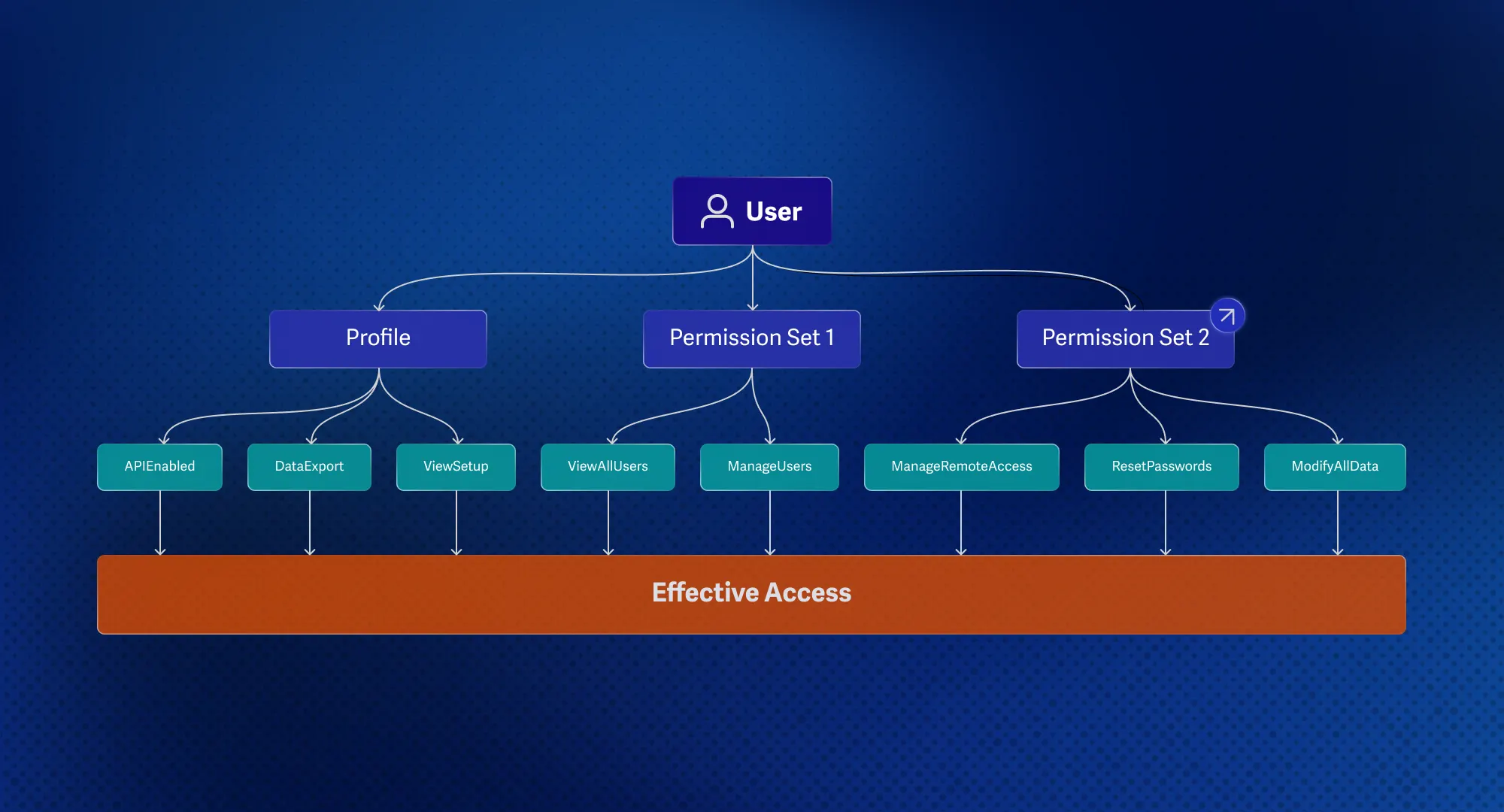
In Salesforce, every user’s access is built on two foundational building blocks: profiles and permission sets. A profile is required for each user and assigned when a user is first created. It defines the baseline of what they can do. Permission sets, on the other hand, are optional additions that layer on top of a profile, granting extra capabilities without modifying the profile itself.
Because the model is purely additive, you can give someone more access, but you cannot take any away through a permission set. A user with a restrictive profile and 10 permission sets may end up with far more access than intended.
Some of these permissions are not as straightforward as they appear. Enabling one can quietly unlock several capabilities underneath. Modify All Data, for instance, doesn’t just let you edit records; it implicitly grants read, create, and delete access across every object in the organization.
API Access and Connected Apps
Not all privileges in Salesforce belong to the user; some are related to third-party integrations. Connected apps are integrations that use OAuth to grant external systems access to an organization. They define how third-party services authenticate and which permissions they receive once connected. Because they often rely on long-lived tokens and broad OAuth scopes, connected apps can function as powerful, persistent integration security principals within the environment.
Salesforce exposes many APIs, such as REST, SOAP, Bulk, Metadata, and Tooling. A user with access to the API and the View All Data permission assigned can programmatically extract the entire contents of an organization in ways that would be impractical through the UI. Connected apps extend this further, granting third-party integrations persistent API access that often outlives the employee who originally authorized them.
This is where privilege gets tricky. A connected app authorized by a Salesforce administrator, often with broad OAuth permissions, can perform privileged actions in the environment with minimal oversight or enforcement. With a valid token, it can access sensitive data, query organization resources, and, in some configurations, even act on behalf of users. However, mapping these complex relationships and permissions can be tedious and extremely difficult in the Salesforce platform.
Apex and the Execution Context Problem
Salesforce gives developers powerful tools to automate and extend the platform. Apex is Salesforce’s proprietary programming language, similar to Java, allowing developers to write and deploy custom logic directly within the organization. An Apex class is a reusable block of code that can be executed in a variety of contexts.
Flows are a low-code alternative, allowing admins and developers to build automated processes through a visual interface. Both are deeply integrated into the platform, and both can be configured in ways that have serious privilege implications.
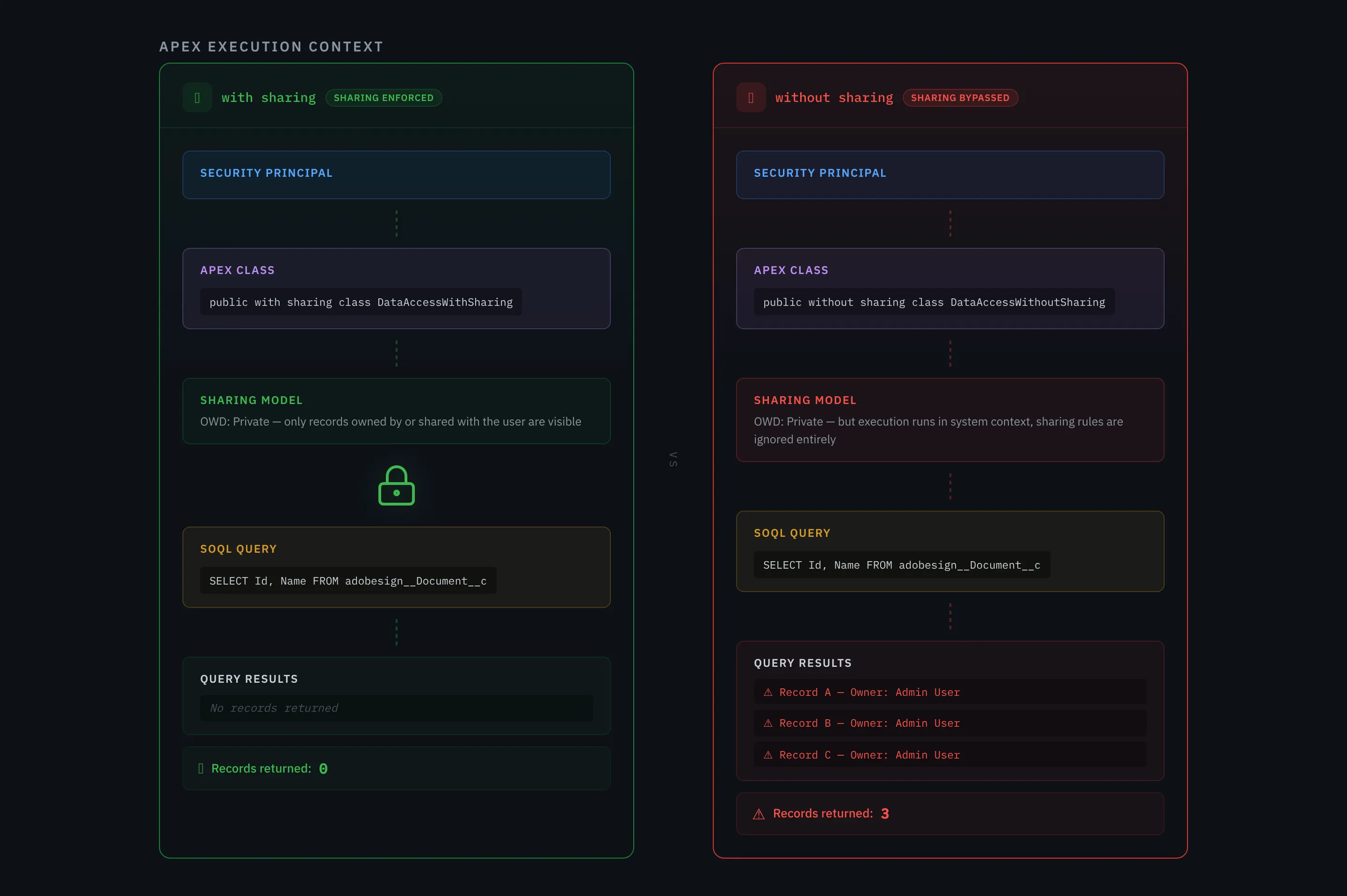
Apex classes, Flows, and other automation tools can be executed under different security contexts, which determine how Salesforce enforces its record-level access controls. An Apex class declared without sharing runs in system context and can bypass the organization’s sharing model. In practice, this means a user doesn’t need explicit data permissions such as View All Data if they’re able to deploy code that executes outside the model. Conversely, an Apex class declared in the with sharing context respects the sharing model, meaning it only returns the records the running user is explicitly allowed to see.
To test this, we set up a new user called Tony Soprano and provisioned it with a Read Only profile.

Now we assign it a Permission Set that only grants the Author Apex permission. This permission grants the ability to write, edit, and test custom Apex code within the organization. While Author Apex is intended for developers, as we will demonstrate, it alone is enough to bypass the Salesforce record-level security model.

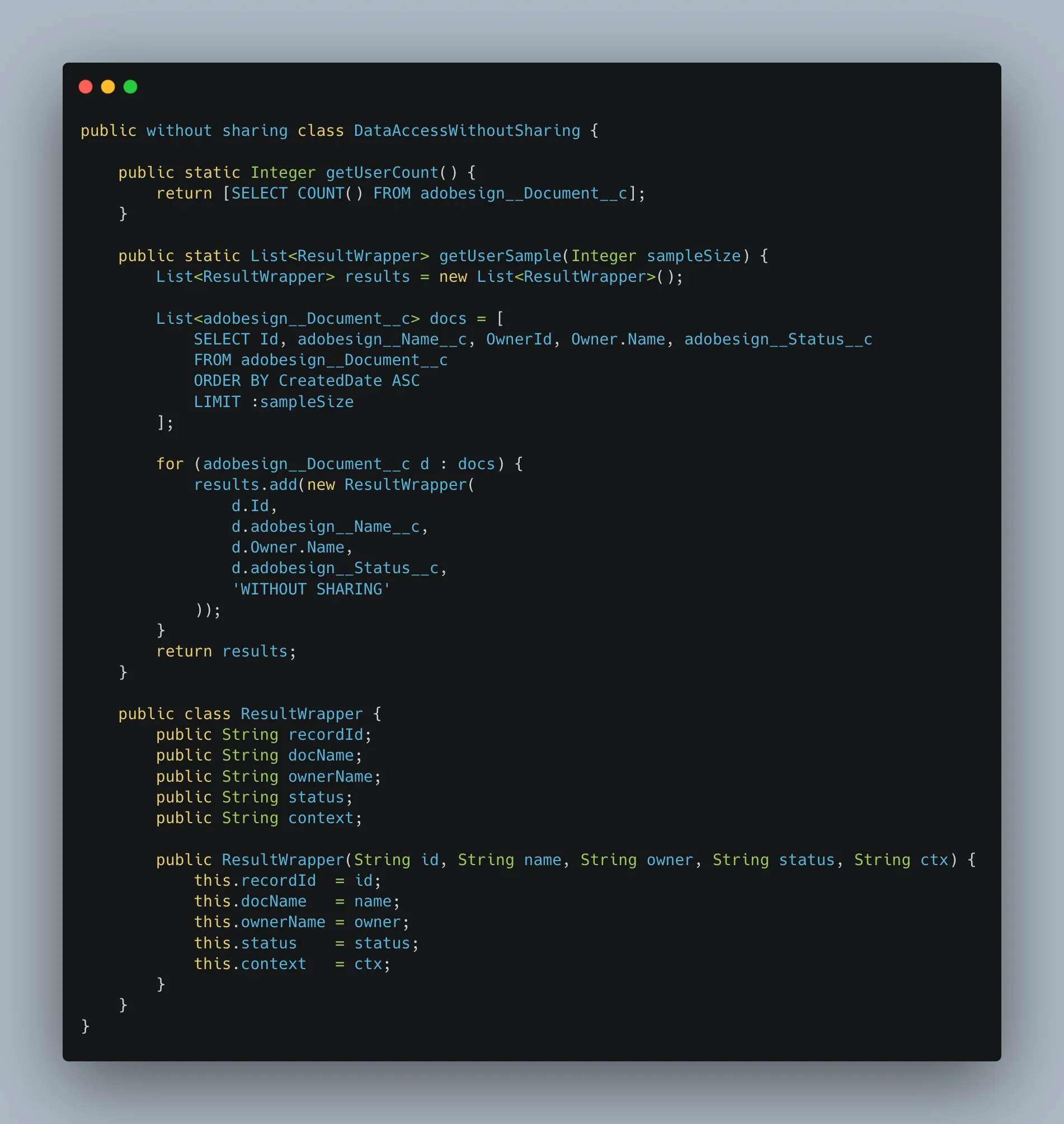
We then deployed two Apex classes in our Salesforce environment. The first runs in the without sharing context and queries a set of test records with a private sharing rule, meaning only the record owner should be able to see them. It also defines a basic result wrapper that both classes utilize. For this test, we used a custom object, but the same technique applies to any object in Salesforce, whether it stores customer accounts, financial records, or support cases.
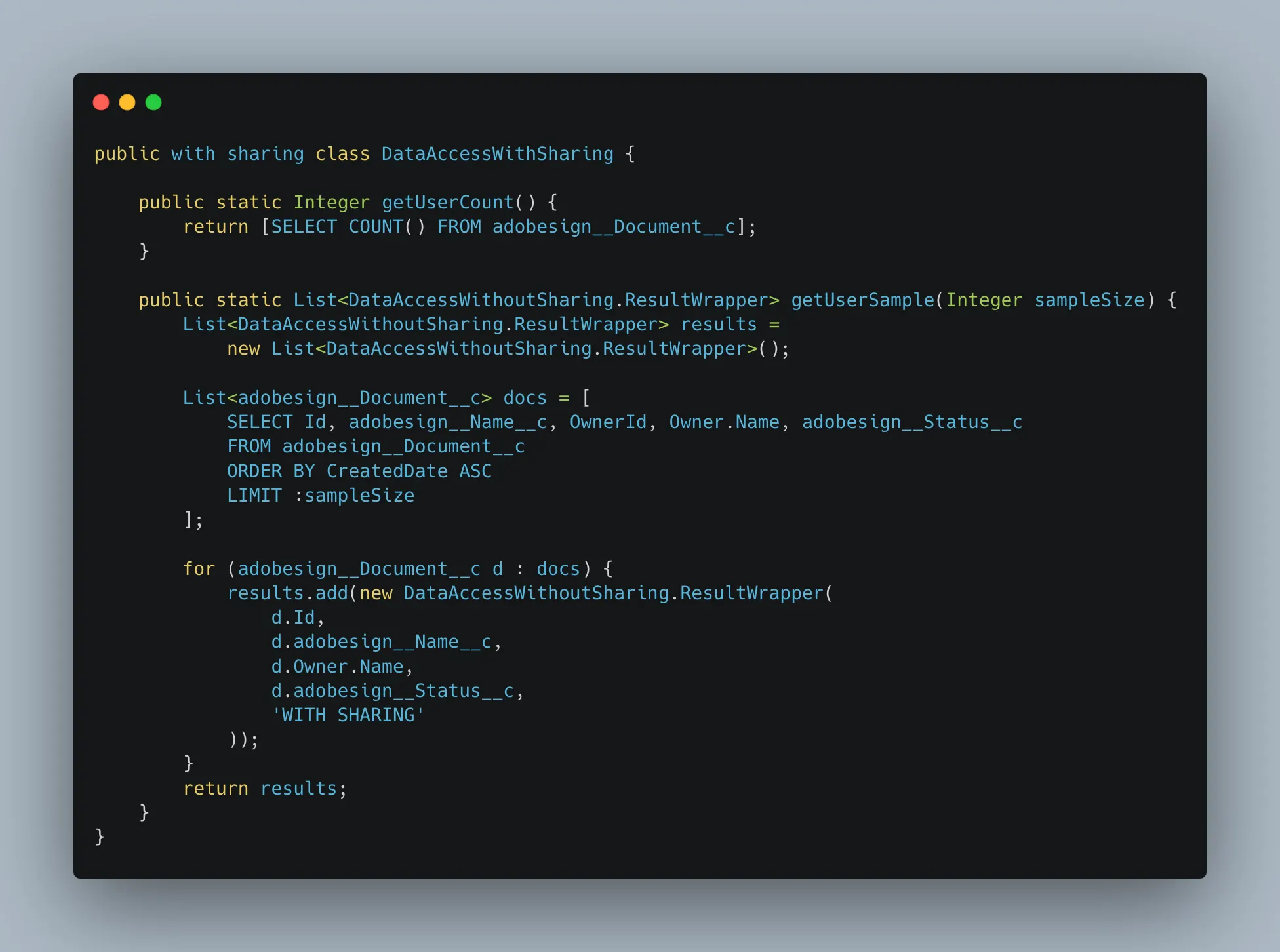
The second Apex class ran the same query in the with sharing context.
Lastly, we need to create a short script that can call both classes.
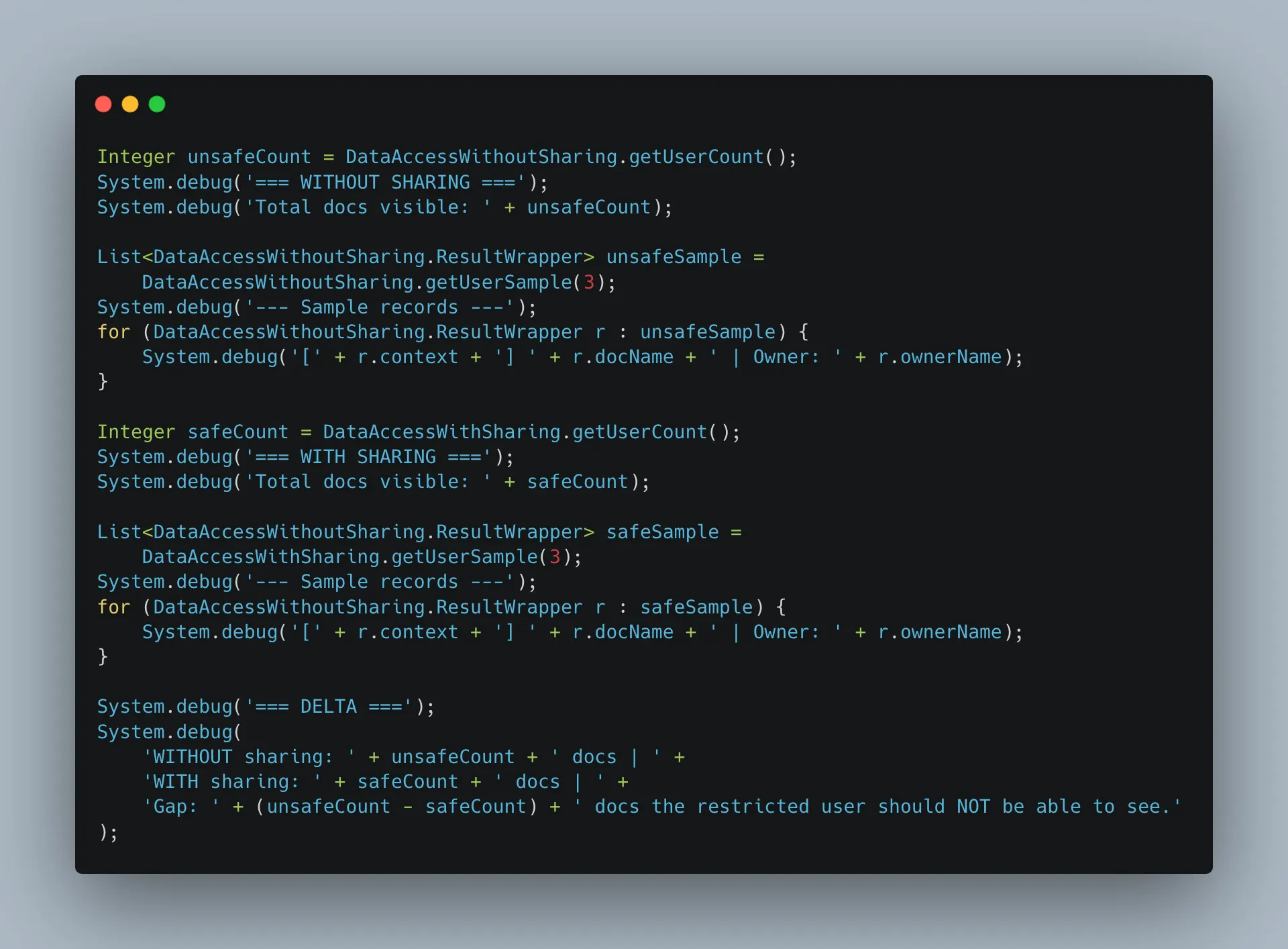
Finally, we can log into the Salesforce CLI as our test user and can see the output of running both classes.

In the with sharing context, the test user can’t see any of the test objects. The records are not owned by the user, and the private sharing rules mean the user has no access to them. In the without sharing context, however, all three test objects are visible to the user. The sharing model is bypassed with a Read-Only profile and a single permission. The same technique works against any custom or standard object in Salesforce: Accounts, Opportunities, Contacts, Cases, and Financial Records.
How Privilege Accumulates
Unmanaged privilege is a growing concern for most organizations. A sales analyst is assigned a permission set to resolve a reporting issue, and it is never removed. A marketing integration ends up with over-privileged access that is not audited. A developer maintains the Author Apex permission after moving to a non-technical role. These scenarios are realistic to many organizations today. Permissions accumulate over time and create unintended privilege that attacks can abuse.
Security review tends to focus on profiles without considering the combined effect of every permission set, every connected app, and every piece of automation that a security principal touches. The effective privilege of a security principal is the sum of all these parts, and that sum is almost always larger than expected.
Mapping The Primitives
To help security teams start understanding privilege in Salesforce, we‘ve cataloged Salesforce’s privileged primitives that can be assigned to security principals. The spreadsheet that can be found here is an inventory of the primitives that can be found in Salesforce, along with whether it is privileged.
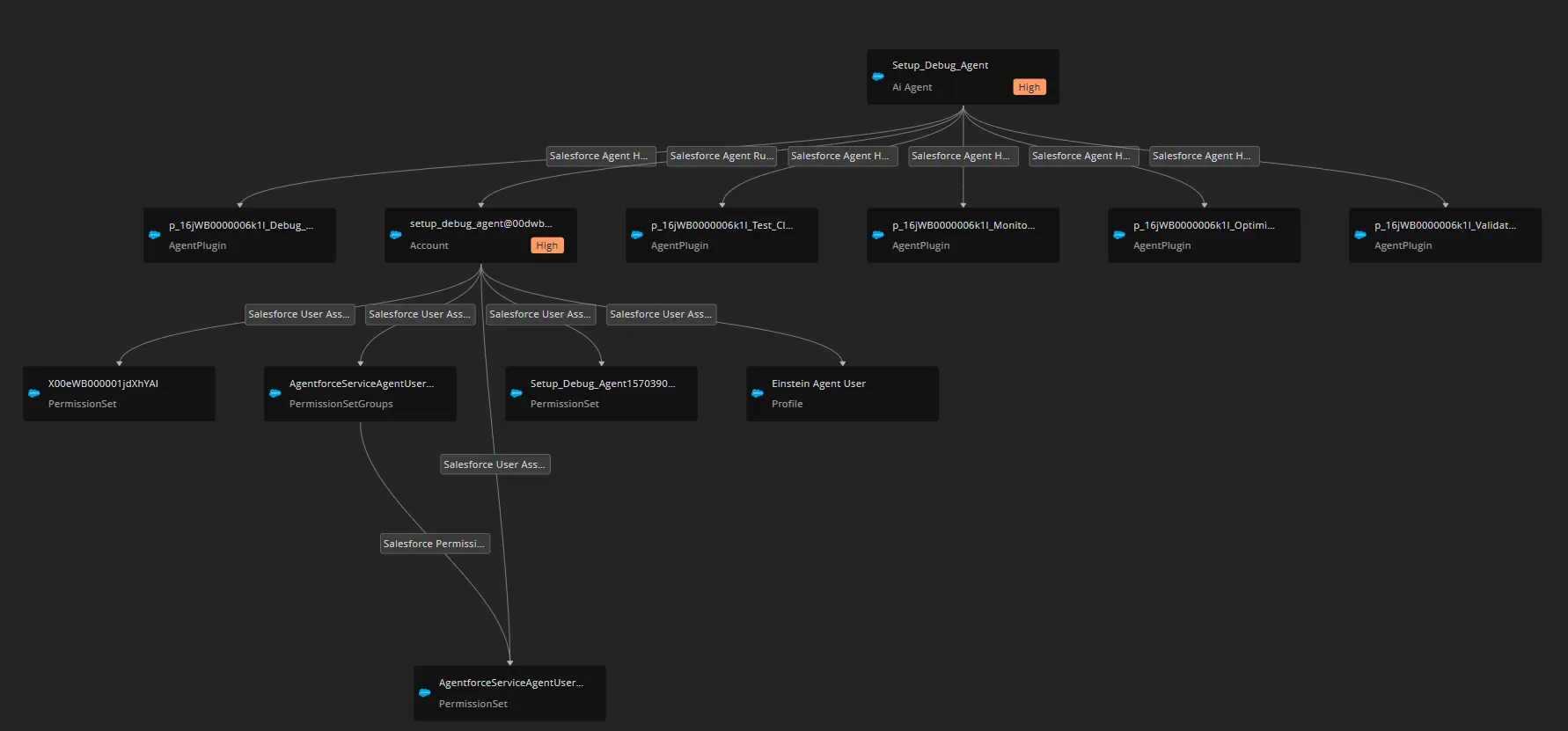
Phantom Labs’ approach to this problem goes beyond static catalogs. Our team constructs an entitlement graph, which is a living map of nodes and edges that represent how privilege flows through a Salesforce organization. Each node represents an identity, permission, or resource, while edges capture the relationships between them. This graph-based model surfaces the shadow admins that spreadsheets miss. By visualizing privilege as a network rather than a list, the entitlement graph makes it possible to identify problematic accumulations of power that would otherwise remain invisible.
Conclusion
The effective privilege of a given user or third-party integration in Salesforce tends to grow unexpectedly, due to the sprawling, additive model that spans profiles, permission sets, connected apps, and more. As we’ve seen, a user with nothing more than a Read-Only profile and a single permission can bypass record-level security. The result is an environment where effective privilege is almost larger than intended, and the security principals carrying that privilege are rarely the ones anyone is watching. Finding and mapping these shadow administrators is not a one-time audit; it’s an ongoing practice that requires understanding of how all these pieces fit together.
About Our Authors
Christopher Calvani is a Security Researcher on BeyondTrust’s research team, where he blends vulnerability research with detection engineering to help customers stay ahead of emerging threats. A recent graduate of the Rochester Institute of Technology with a Bachelor of Science in Cybersecurity, Christopher previously supported large‑scale infrastructure at Fidelity Investments as a Systems Engineer intern and advanced DevSecOps practices at Stavvy.
Phantom Labs™
BeyondTrust Phantom Labs™ believes the best way to fully understand cybersecurity threats is to work closely with our customers and partners, conducting real world research into the attacks that matter most to them. By dissecting emerging attack methods and exploitation techniques of threat actors, as well as conducting novel research, the team’s mission is to help organizations defend against identity threats.